
This Site Was Built for Agents

This Site Was Built for Agents
MARCH 06, 2026
Update — May 2026
A full deep dive on the MCP layer is now live: The MCP Server Behind Janisheck.com. Six resources, four tools, and the evaluateFit recruiter — all the implementation details the section below only skims.
Most personal sites are built for humans to browse. Mine is too, but that's only half the job now. I built this site so AI agents can discover me, evaluate me for roles, and have a conversation — without ever rendering a single webpage.
The job market runs on agents now. Recruiters use them. Hiring managers use them. Companies point an AI at a stack of candidates and ask "who fits?" If your online presence only speaks HTML, you're invisible to half the pipeline.
So I gave this site multiple layers of machine-readable intelligence — from static files to a full MCP server to Google's A2A Agent Card protocol. Each one targets a different level of agent sophistication. And I made sure the crawlers that power those agents are explicitly invited in.
How AI Discovery Actually Works
Before the technical layers, it's worth understanding what actually happens when someone asks Claude or ChatGPT to find a person. The mechanics are more mundane than most people think.
The model reformulates your question into search queries. Claude hits Brave Search. ChatGPT hits Bing. Perplexity runs its own index. Results come back as titles, snippets, and URLs. The model fetches content from 3 to 10 pages, reads short snippets, and synthesizes a response. That's it. No magic. No deep web crawling. Just search results and training data.
The citation landscape is brutally concentrated. Research tracking 680 million-plus AI citations shows the top 5 domains capture 38 percent of all citations, and the top 20 control 66 percent. Wikipedia alone accounts for 16.3 percent of ChatGPT citations. Reddit is second — 40.1 percent citation frequency in one major study. LinkedIn ranks top 10 for Google AI Overviews and Perplexity. One mention in TechCrunch carries more weight for AI discovery than ten self-published blog posts.
Content freshness matters. Pages updated within 30 days get 3.2x more citations than older material. Articles with statistics and expert quotes get up to 40 percent more AI citation visibility. Keyword stuffing actually performs worse in generative engines. The Princeton GEO research confirmed it: AI search favors earned media over brand-owned content.
The fundamental limitation: AI assistants can only name people who appear in search results or training data. Without web search enabled, models fall back on training data — and only extremely prominent people exist there. Hallucination risk is acute for people queries. OpenAI's own testing shows GPT-o3 gives false answers about well-known people roughly one-third of the time. So agents are deliberately cautious. They'll say "check the speaker list" rather than risk fabricating credentials.
That's the honest reality. The protocols below are forward bets on infrastructure that's still being built. But the infrastructure is being built fast, and it costs almost nothing to be ready.
Layer 0: Let the Crawlers In
None of this matters if the AI crawlers can't reach your content. AI crawler traffic grew 6,900 percent year-over-year in 2025. Blocking them means invisibility in AI-generated responses.
There are two kinds of AI crawlers: training crawlers that ingest content for model training, and retrieval crawlers that fetch content in real time when a user asks a question. For discoverability, retrieval crawlers are what matter. ChatGPT-User and OAI-SearchBot for OpenAI. Claude-User and Claude-SearchBot for Anthropic. PerplexityBot. Google-Extended for Gemini. Meta-ExternalFetcher. Applebot-Extended.
My robots.txt explicitly names and allows all 14 — both retrieval and training bots. The wildcard User-agent: * technically covers everything, but named entries make intent unambiguous. Some AI providers check for explicit permission before fetching. No reason to leave it to interpretation.
One thing to be aware of: ChatGPT Atlas — OpenAI's agentic browser — uses standard Chrome user-agent strings. It's indistinguishable from normal traffic. You can't block it even if you want to. The robots.txt discovery hints at the bottom also point crawlers to /llms.txt, the MCP endpoint, ai.json, and the Agent Card. Crawlers that read robots.txt comments get a map to everything.
Layer 1: Static Files for Dumb Crawlers
The simplest layer follows the llms.txt convention — a markdown file at /llms.txt that any LLM can fetch and read. It's like robots.txt but for language models. Name, title, what I do, what I've built, how to reach me. Fifty lines. No parsing required.
The honest caveat: no major AI provider has confirmed they actually use llms.txt during inference. Google's John Mueller compared it to the keywords meta tag. Server log studies show only 0.1 percent of AI bot visits target the file. But it costs nothing to maintain and works beautifully as a manual context-loading mechanism — paste the URL into ChatGPT or Claude and get instant context. Low cost, optionality preserved.
For agents that want depth, /llms-full.txt has the complete picture: full career history, technology stack, project details, recommendations, and even a Claude Desktop config snippet for connecting to my MCP server. Takes about two seconds to fetch and costs almost nothing in tokens.
Both are plain text. No API keys, no authentication, no rate limits. An agent running on a $5 VPS can read them.
Layer 2: Structured Data for Search Crawlers
The HTML carries enriched JSON-LD — a Schema.org @graph with Person, WebSite, and ProfilePage entities. Google and Bing already index this. AI-powered search engines like Perplexity and SearchGPT use it to build knowledge graphs. When someone asks an AI "who builds multi-agent systems in Austin," the structured data is how I show up.
The Person schema does more than list topics. Each knowsAbout entry links to its Wikidata entity — blockchain points to https://www.wikidata.org/wiki/Q20514253, Ethereum to Q20762811, and so on across 16 topics. This isn't for humans. It's entity disambiguation for knowledge graphs. An AI system that understands Wikidata IDs can connect "Joey Janisheck" to the exact same concepts across Wikipedia, Google Knowledge Graph, and every dataset built on Wikidata.
makesOffer describes four services — fractional CTO, AI agent development, full-stack development, and blockchain development — as structured Offer/Service objects. When an AI is asked "find someone who builds MCP servers," the schema gives it a direct signal instead of hoping it parses my prose. subjectOf links to key blog posts that demonstrate the work, and a ProfilePage entity wraps the resume page with a mainEntity reference back to the Person. Schema markup can boost AI citation chances by up to 36 percent according to industry research.
Microsoft's NLWeb framework — launched in Yoast SEO 27.1 in early March 2026, led by R.V. Guha who co-created Schema.org itself — transforms websites into conversational AI interfaces by crawling and extracting JSON-LD markup. Every NLWeb instance is also an MCP server. The structured data I've been maintaining is suddenly the primary input for a framework backed by Microsoft, Tripadvisor, and Shopify. Good timing.
The site also publishes /.well-known/ai.json — a machine-readable profile with skills, highlights, and discovery links — and /.well-known/mcp.json for MCP auto-discovery. The HTML head includes <link rel="mcp"> pointing to the endpoint. Three different ways for an agent to find the same door.
Layer 2.5: Meta Tags and Inline Hints
Nothing is standardized yet, so I layered every emerging convention I could find. The HTML head carries llms:description and llms:instructions meta tags — an agent that fetches any page can immediately see who I am and where to get the full data without parsing my HTML.
There's also an inline <script type="text/llms.txt"> block following Vercel's proposal — it embeds a short profile summary and all the discovery URLs directly in the page source. Zero extra round trips. The agent gets the essentials on the first fetch.
And every HTTP response ships Link and X-Llms-Txt headers pointing to the llms.txt file and MCP endpoint. The most sophisticated agents can discover everything from the headers alone without even reading the HTML body. Belt, suspenders, and a backup belt.
Layer 2.7: Skills for Agent Tooling
A new standard is emerging for something the previous layers don't cover: how to actually work with a site, not just who runs it. The agentskills.io spec — adopted fast by Anthropic, OpenAI, Microsoft, Cursor, and Cloudflare — defines a /.well-known/skills/ directory that publishes instruction files for AI agents. Same idea as robots.txt, but the audience is Claude Code and Codex, not Googlebot.
This site now publishes three. One teaches agents how to search and read blog posts via the MCP server. One covers professional engagement — how to check availability, pull contact info, and run the evaluateFit analysis. One is a full developer reference for the MCP API itself, with every tool documented against the actual server implementation.
The practical result: a developer runs npx skills add https://janisheck.com and gets all three installed in Claude Code, Cursor, or Codex. The agent knows how to search my posts, evaluate fit for a role, and call my API — without reading a single documentation page.
Each skill file is a few hundred tokens. Agents load them on demand. Discovery happens through /.well-known/skills/index.json, which both ai.json and mcp.json point to. One index closes the loop on the whole stack.
Layer 2.9: A2A Agent Card
Google's Agent-to-Agent protocol launched in April 2025 with 150-plus supporting organizations and is now governed by the Linux Foundation. Its core mechanism is the Agent Card — a JSON file at /.well-known/agent-card.json that serves as a digital business card for AI agents. Identity, capabilities, skills with tags, authentication schemes, and service endpoints. All in one file, at a URL every A2A-aware agent knows to check.
This is the protocol most naturally suited to personal discovery. MCP handles agent-to-tool communication — vertical. A2A handles agent-to-agent communication — horizontal. They're complementary. For a person trying to be found by AI agents, A2A's Agent Card is the more natural fit. For exposing queryable professional data, the MCP server adds interactive capability. I run both.
My Agent Card declares eight skills: evaluate-fit, search-projects, search-blog, get-contact-info, fractional-cto, ai-agent-development, blockchain-development, and full-stack-development. Each has tags, descriptions, and example queries. The interfaces section links to the MCP endpoint, web pages, and social profiles. An agent that fetches the card knows what I do, what I offer, how to interact with my MCP server, and where to find me on LinkedIn and GitHub — all from a single JSON fetch.
Registry infrastructure and web-scale discovery crawling of Agent Cards don't exist yet. The A2A spec explicitly identifies this as a gap. But the standard is well-defined, backed by Google and the Linux Foundation, and the convention is trivial to implement. When the crawlers come, the card will be waiting.
Every HTTP response also ships a Link header with rel="agent-card" pointing to the file, and the HTML head carries a <link rel="alternate"> tag for it. The inline llms.txt script, ai.json, and mcp.json all cross-reference the agent card URL. Same philosophy as everything else: every discovery path leads to every other discovery path.
Layer 3: MCP for Smart Agents
This is the interesting one. The site runs a full MCP server at /api/mcp — Model Context Protocol over JSON-RPC 2.0. Any agent that speaks MCP can connect and query six profile resources: summary, skills, experience, projects, recommendations, and availability.
It also exposes four tools. searchProjects filters my work by technology or industry. searchBlog searches 262 blog posts. getContactInfo does what it says. And the one I'm most proud of: evaluateFit.
Send evaluateFit a job description and it returns a structured analysis — fit score, matching skills, relevant experience, gaps, and a recommendation. The tool pulls my full profile, constructs a prompt, and runs it through gpt-5-nano for the analysis. An AI recruiting agent can evaluate my candidacy for a role in a single API call.
Over 120,000 requests served so far. Agents are already using it.
The Human Layer
For people who still prefer typing, there's Virtual Joey — the chatbot in the bottom right corner. It knows what page you're on and adjusts accordingly. The preset questions stream back cached responses instantly. Free-form questions hit the API. It sounds like me because I wrote the answers myself.
What Actually Moves the Needle
Here's the honest stack-rank. The single highest-impact thing for AI discoverability isn't any protocol — it's getting mentioned on sites AI assistants cite. Wikipedia. Reddit. Forbes. LinkedIn. TechCrunch. One quote in an industry publication outweighs everything else on this page combined. Reddit alone accounts for 40 percent of LLM citation frequency in one major study. Perplexity pulls 6.6 percent of all its citations from Reddit.
Second tier: optimize your about page as an answer capsule. Structure the first sentence to directly answer "Who is [your name]?" followed by expertise, location, and credentials. That's exactly what AI assistants extract. Implement comprehensive Person schema with Wikidata links, makesOffer, sameAs, and address. Unblock all AI retrieval crawlers. Submit to Bing Webmaster Tools — ChatGPT uses Bing for all its web searches.
Third tier: the forward-looking infrastructure. Host an A2A Agent Card. Keep your MCP server running. Register it in the official MCP Registry, PulseMCP, and mcp.so. Maintain llms.txt as a low-cost bet. Write long-form content with statistics — articles over 2,900 words earn significantly more citations than short posts.
The whole system cost nothing beyond the infrastructure I already had. Static files, JSON-LD, an MCP endpoint, an Agent Card, named crawler permissions, a chatbot that doesn't make people wait three seconds to hear "Great question!" — and a few hours of work spread across weekends.
The gap between where AI discovery is today and where the technical standards point is significant. No "LinkedIn for AI agents" exists yet. The A2A registry infrastructure isn't built. llms.txt has zero confirmed usage by any major provider during inference. But the protocols are well-defined, adoption is accelerating, and implementation costs are near zero.
If you're a builder with a personal site, you should be doing this. Your next opportunity might come from an agent that never opens a browser. Whether it finds you depends on what's waiting when it looks.

Midjourney Alpha vs Sora 2: AI Showdown
A direct comparison of Midjourney and Sora 2 video generation across four fantasy themes. Same prompts, wildly different results—revealing the strengths and limitations of each platform's approach to motion.

Colorizing History with AI
Using AI to breathe life into black and white photographs, transforming historical icons into vivid portraits that bridge past and present.

Steve Jobs 10 Years
It is hard to believe that Steve Jobs died 10 years ago today. I remember pretty clearly where I was when I read the news. I was on the train back from downtown and looking at some geek website when the headline was that Steve Jobs had died.
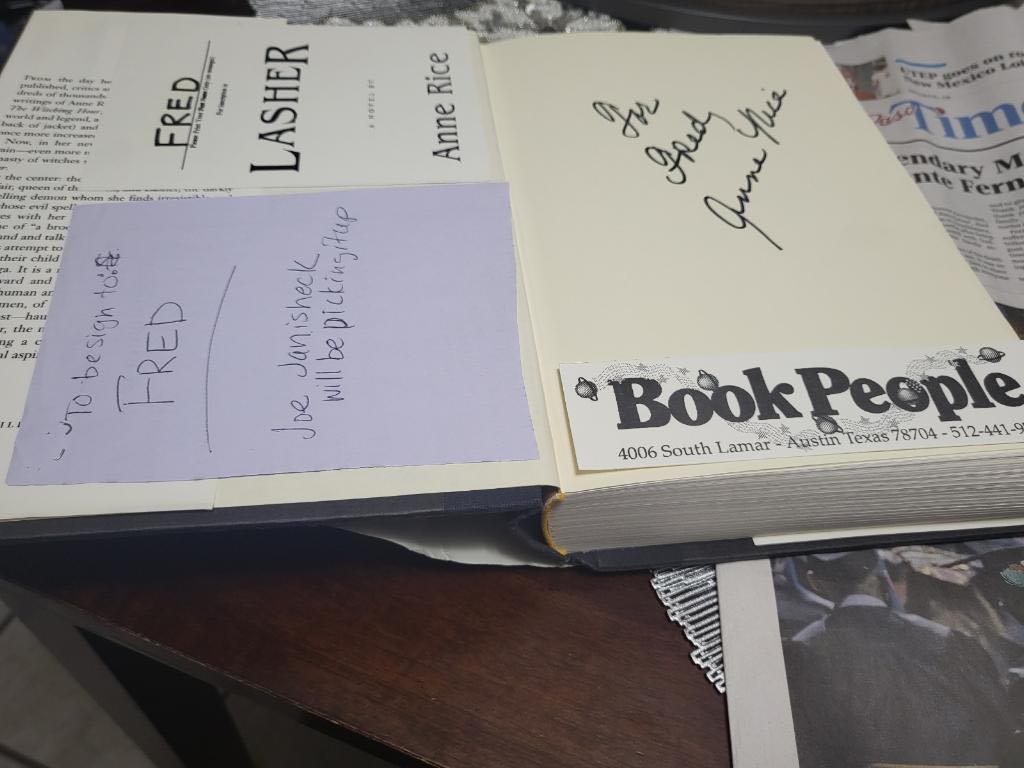
Anne Rice Signature
My buddy Fred reminded me of the time that I waited to see Anne Rice at Book People here in Austin many years ago. He wanted a signed copy of her latest book and I waited in line for hours for a 10 second hello and signature.

Tesla Factory Tour
Today I got to take a tour of the Tesla factory in Fremont, California. It’s in the Bay Area and is HUGE. As an owner, I get the opportunity to tour their facilities. However, you can’t bring your camera into the factory floor.